
An interactive Vite app does not necessarily need to generate CSS in the browser. A button can switch between two classes whose rules already exist in a static stylesheet. The useful distinction is when the complete class names become available, not whether the interface changes.
Consider a client-rendered app whose source contains two button colors, whose built HTML contains an empty mount point, and whose first browser render shows one button. Those three inputs describe the same app, but they give Master CSS different sets of classes.
On this page
#One app, three inputs
Start with an existing Vite setup, including its loaded CSS entry. This small vanilla example keeps both variants in source and creates the button in JavaScript:
<div id="app"></div><script type="module" src="/src/main.js"></script>import './style.css'const tones = { blue: 'bg-blue', neutral: 'bg-neutral' }const button = document.createElement('button')let active = falsefunction update() { button.className = active ? tones.neutral : tones.blue button.textContent = active ? 'Selected' : 'Select'}button.addEventListener('click', () => { active = !active update()})update()document.getElementById('app').append(button)The source contains bg-blue and bg-neutral. The HTML file contains neither: JavaScript has not created the button yet. Once the browser runs the entry module, the connected button has bg-blue. Clicking changes it to bg-neutral.
One app, three sets of classes
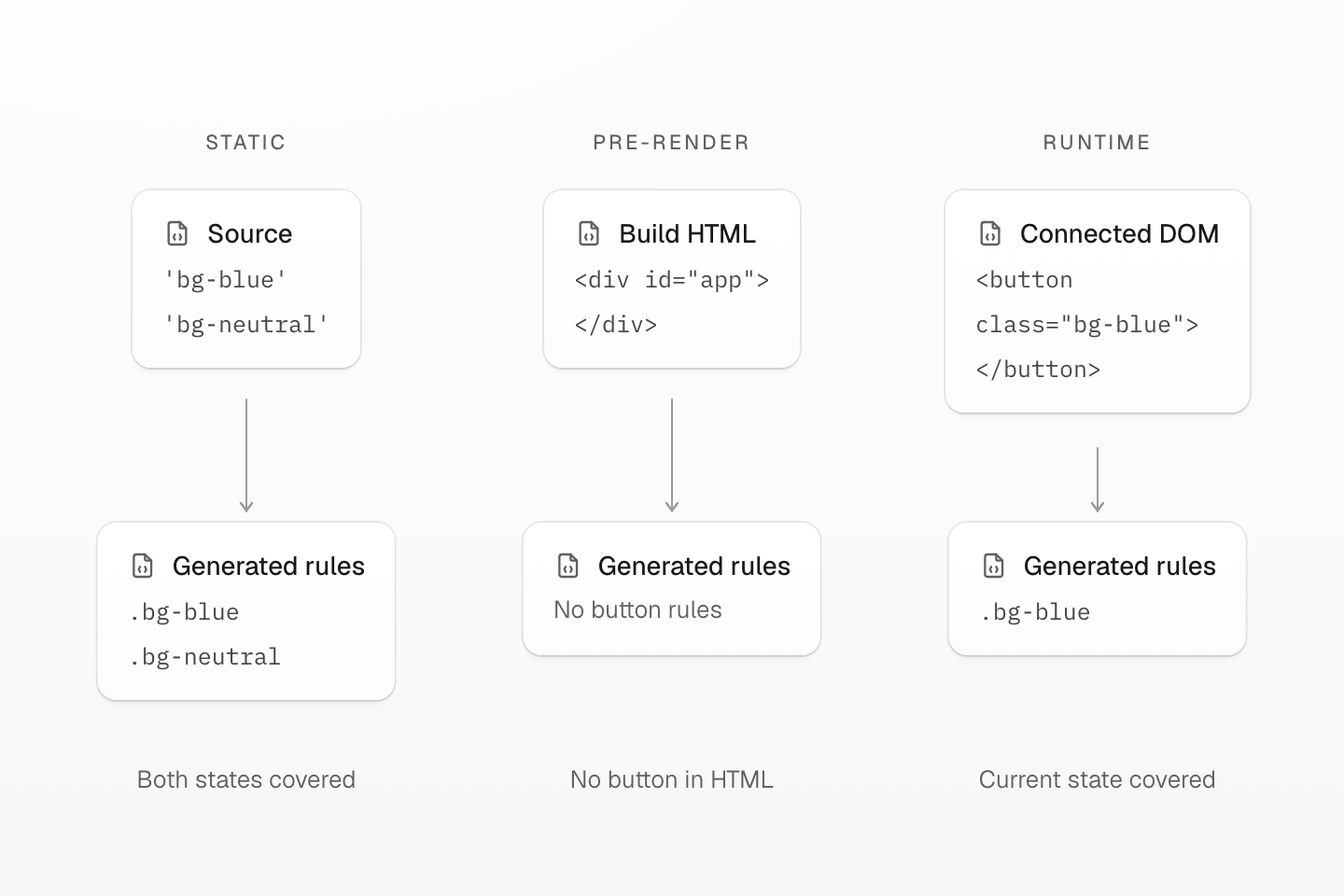
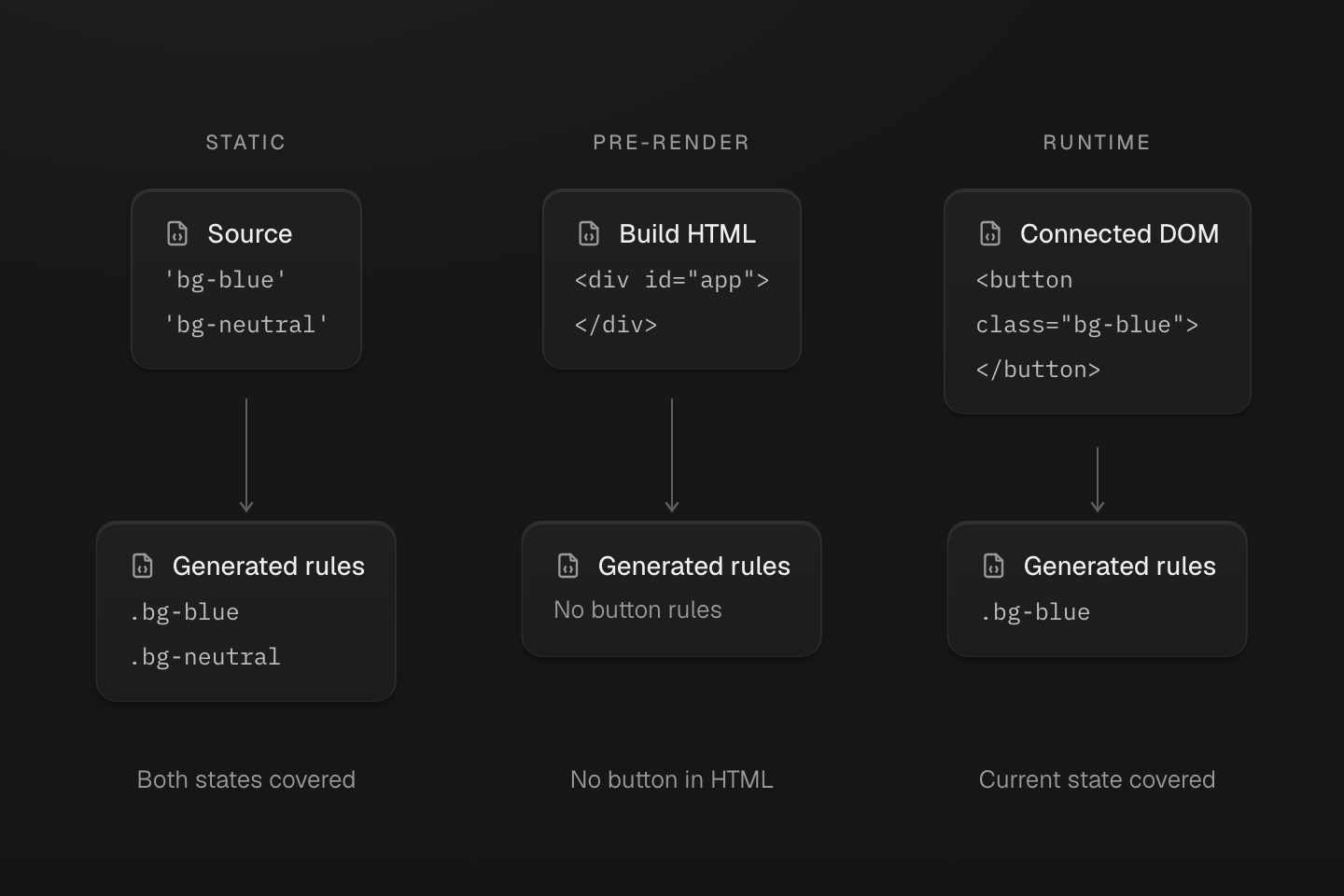
These are alternative generation inputs for the same client-rendered app. Changing a class can reuse existing static CSS; an empty HTML mount point provides no initial button rules.
Text description
- Source → static CSS. The button source contains both bg-blue and bg-neutral. Static mode generates both rules before either state is selected.
- Build HTML → pre-rendered CSS. The emitted HTML contains only an empty app mount point. It has neither button class, so pre-render mode generates neither button rule.
- Connected DOM → runtime CSS. The first browser render connects a button with bg-blue. Runtime mode generates that rule; switching to bg-neutral later generates its rule too.
The figure compares inputs to three generation strategies. It does not show three sequential build stages or a recommendation to run all three modes.
#Static CSS can cover a changing interface
With the default masterCSS() plugin configuration, the scanner finds both complete strings in src/main.js. The generated stylesheet contains both rules, although only one class is on the button at a time. Clicking switches which existing rule matches; it does not ask Master CSS to generate CSS.
This is a useful fit for finite states such as size choices, status labels and navigation selection. Keep the full class strings in the mapping. Constructing `bg-${tone}` instead removes that source evidence: the scanner does not execute the interpolation to discover its possible results. Scanning and pruning owns the complete-class workflow and explicit source exceptions.
CSS availability and application rendering are separate. If JavaScript is disabled in this example, the static stylesheet still exists, but the button does not: application code creates it. A static Master CSS mode is not a promise that a client-rendered app works without JavaScript.
#An empty mount point is not a rendered page
Vite's ordinary production build takes index.html as its default entry. Master CSS pre-render mode processes the HTML the build emits; it does not run the application entry to turn the mount point into a button.
With masterCSS({ mode: 'pre-render' }), this example supplies no button classes in that HTML, so there are no generated rules for either button color. The browser can create the button later, but pre-render mode supplies no Master CSS runtime to generate its missing rules.
Pre-render mode is useful when the build actually emits populated HTML. If that HTML already contained <button class="bg-blue">Select</button>, Master CSS could generate the blue class rule from it. The neutral variant would still need another CSS source if it appeared only after a click. Use the framework's integration when the framework owns HTML generation.
#Browser generation follows connected classes
With masterCSS({ mode: 'runtime' }), the runtime observes the connected button and generates the blue rule. When clicking introduces the neutral class, it generates that rule too. Rules may remain cached after their last element stops using them; connected usage is not a promise of immediate CSS removal.
This approach can handle complete class names that first exist in the browser, such as input from a visual editor. It also makes generated styling depend on runtime startup. For the finite map above, static mode already covers both states without that dependency.
#Where progressive rendering helps
Progressive mode combines CSS generated from emitted HTML with browser support for later classes. It has the same HTML boundary as pre-render mode: an empty mount point cannot provide initial button rules. In that case, the browser still has to generate those rules after application code creates the button.
The combination becomes useful when HTML already covers the initial interface and additional classes genuinely appear later. The initial generated CSS arrives with that document; a page hydration manifest lets the runtime track covered classes while its engine is deferred. A class outside that manifest starts the engine. The Rendering modes Guide owns the complete mode comparison, hydration behavior and failure conditions.
This mechanism establishes when CSS is available. It does not establish a paint-time improvement or a smaller total download; those depend on the application and require measurement.
#Verify the input before changing modes
Build the example for production, then compare the emitted HTML with the live DOM. The HTML should still have the empty mount point; the DOM should have the button after JavaScript runs. In static mode, inspect the linked generated stylesheet for both .bg-blue and .bg-neutral, then click the button to confirm that both states are styled.
If evaluating pre-render or progressive mode, look for actual application classes and their rules in the response's style#master-css. Inspect response source rather than only the live DOM, where browser generation can conceal missing initial coverage. Development behavior alone does not establish production delivery.
Keep static mode when source-visible classes cover the task. Choose a different input because it contains information the source cannot provide, then verify that the chosen lifecycle really supplies it. Installation remains in the Vite Guide; rendering contracts remain in Rendering modes.