

A component can construct a class name that is absent as a complete string in source. If Next.js renders that component during the build, the final HTML contains the class, even though a source scanner cannot infer it. Progressive rendering in @master/css-next uses that HTML to generate the page's CSS, then lets the Master CSS runtime handle new classes in the browser.
Static rendering remains the default. Use it when complete class names are visible in source and an ordinary generated stylesheet meets your needs. Choose progressive mode when static or pre-rendered pages need CSS from their final markup and runtime support for later class changes.
The boundary is build-time HTML. The adapter processes static and pre-rendered outputs from next build. It does not process dynamic SSR responses produced at request time; in progressive mode, those responses rely on the browser runtime for generated rules.
On this page
#Why final HTML is useful
Next.js's Adapter API exposes the completed build output. @master/css-next uses its onBuildComplete hook to locate static and pre-rendered HTML and pass each document to the Master CSS server renderer.
At that point, the page has already combined its layouts, components, and content into markup. Master CSS can read the class strings in that document without inferring how the application constructed them. This is useful for generated markup and component variants, provided that Next.js emits their HTML during the build.
#Progressive rendering in Next.js
The handoff has three parts:
- Next.js produces static and pre-rendered HTML during
next build. - Master CSS reads each document and inserts its generated rules in
style#master-css. - The browser runtime tracks classes already covered by the page manifest. An uncovered class starts the engine, which validates and adopts matching rules before generating new ones.
Next.js progressive boundary
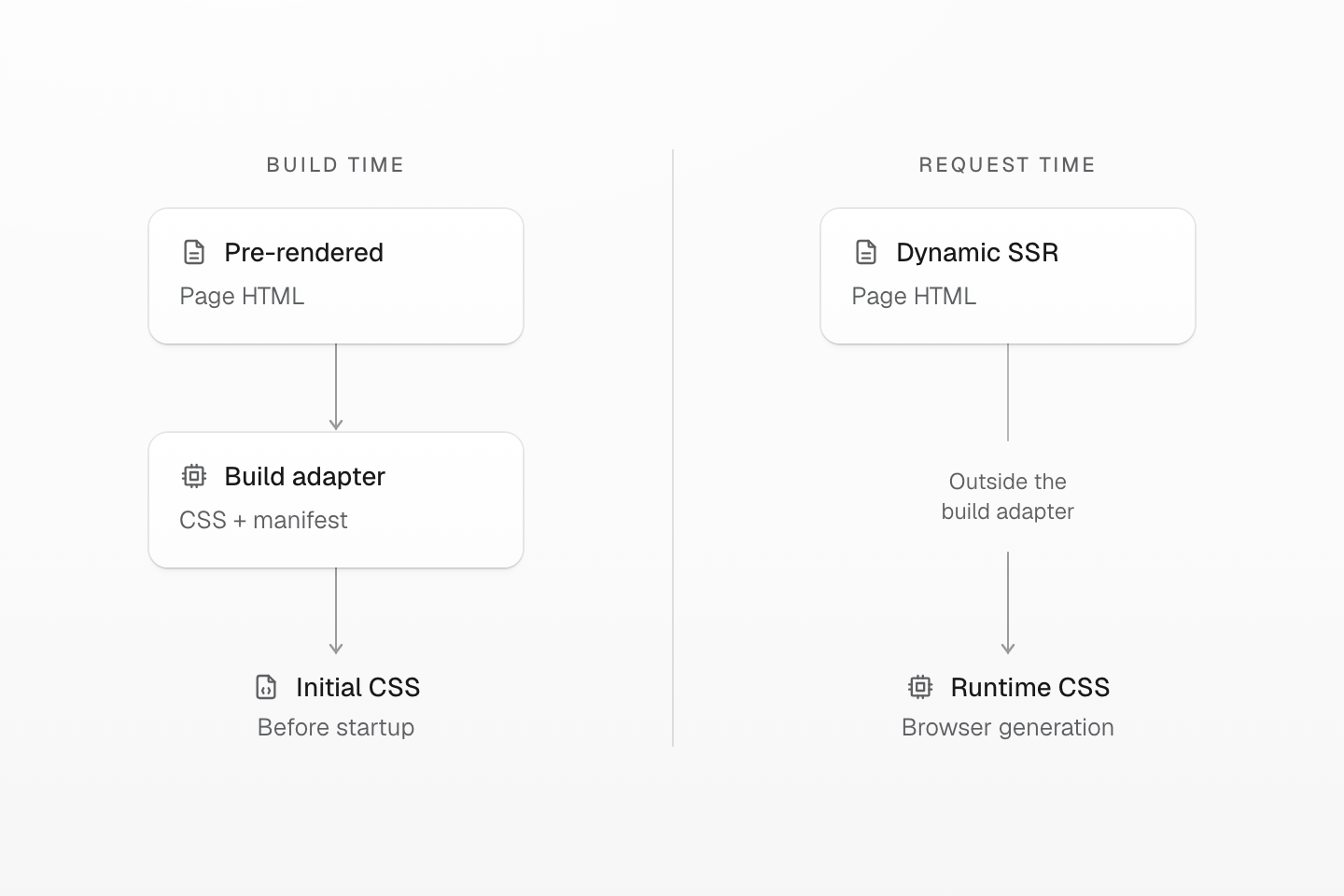
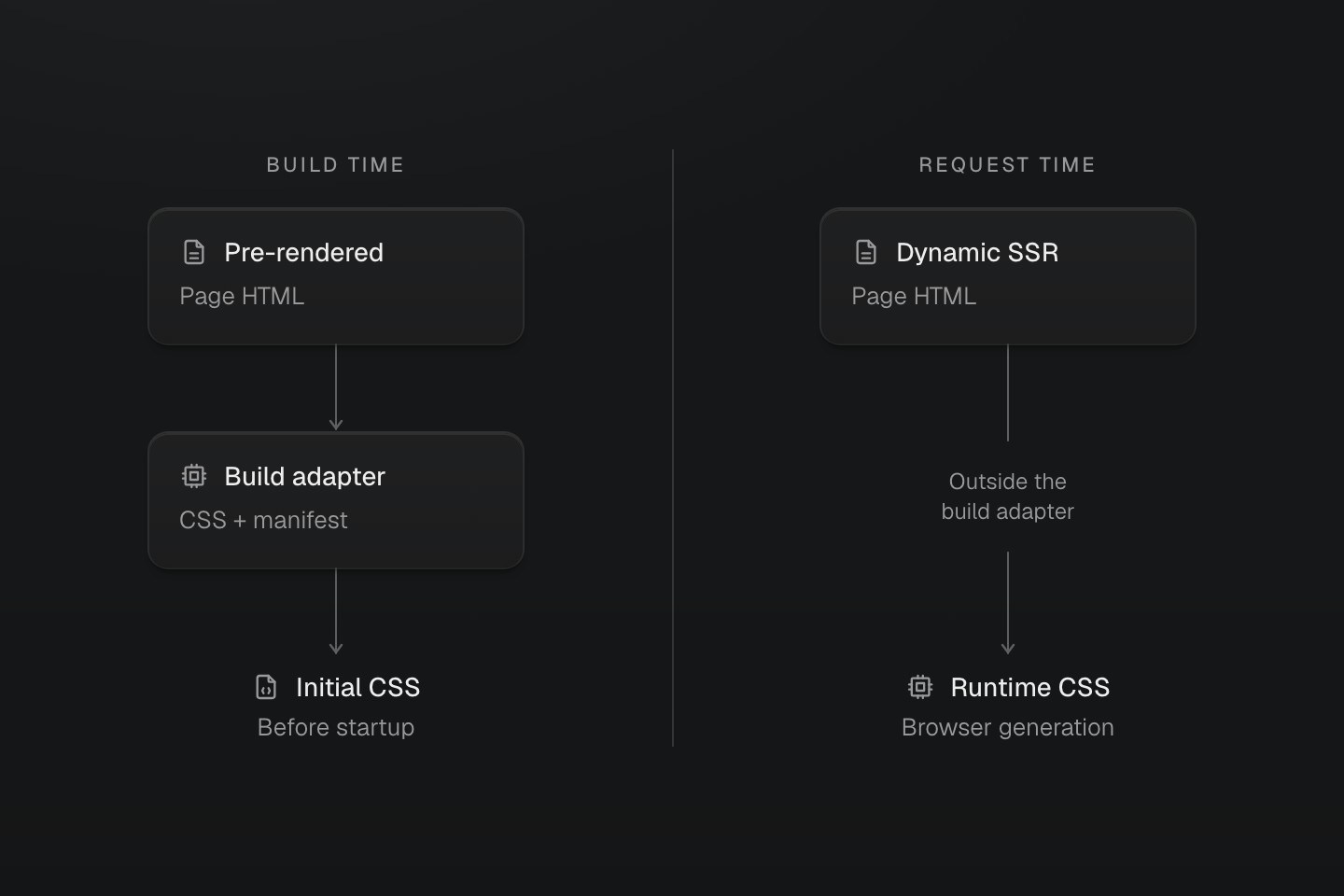
Verify a pre-rendered page and a dynamic route separately. Build-time CSS coverage does not establish request-time SSR coverage.
Text description
- Build-time HTML. Next.js emits static or pre-rendered HTML. The Master CSS build adapter inserts the generated CSS and supplies page hydration data.
- Request-time HTML. A dynamic SSR response is produced after the build adapter has finished. This integration does not pre-render its generated CSS; progressive mode relies on the browser runtime for those rules.
#CSS and the runtime handoff
A document with generated rules receives an external page hydration manifest. The style element points to that manifest through data-master-css-hydration-manifest, so the runtime can track covered classes while its engine is deferred. When the engine starts, it validates and adopts matching CSSOM rules. The runtime loads its engine when it needs to generate a class outside the page manifest.
The inline CSS is usable before that handoff. The manifest supports continued rule management; it is not required for the browser to apply the CSS already in the document. See Rendering modes for the full delivery and hydration behavior.
#Verify a production handoff
Follow the Next.js installation guide to select progressive mode and load the CSS entry. The example below assumes that setup; keep configuration and adapter-composition options in the integration guide.
Use a page that Next.js pre-renders during the build. Put <Badge tone="blue" /> from the next section on that page, then run:
npm run buildnpm run startInspect the page's response source. Its style#master-css should include the blue badge's generated rules and a data-master-css-hydration-manifest reference. Confirm that the referenced asset loads. Use response source rather than only the live DOM: runtime generation can otherwise conceal missing build-time CSS.
Next, introduce <Badge tone="neutral" /> through a client interaction. When that class is outside the page manifest, browser generation supplies its missing rules. This second observation tests continuation; the initial response tests build-time coverage. Rendering modes explains the runtime readiness and recovery boundaries.
#Source scanning and rendered classes
Master CSS source scanning needs complete class strings; it does not evaluate component interpolation. An explicit map containing every complete class is suitable when the variants are known in advance.
Progressive rendering can instead use the class names that appear in the pre-rendered document. Consider this component:
export function Badge({ tone }: { tone: 'blue' | 'neutral'}) { return ( <span className={`px-xs py-3xs r-sm bg-${tone}/.1 fg-text-${tone}`}> New </span> )}Rendering <Badge tone="blue" /> produces:
<span class="px-xs py-3xs r-sm bg-blue/.1 fg-text-blue">New</span>Rendering <Badge tone="neutral" /> produces:
<span class="px-xs py-3xs r-sm bg-neutral/.1 fg-text-neutral">New</span>If either badge is present in the build-time HTML, the adapter generates CSS for that actual class list. The foreground classes resolve to color: var(--color-text-blue) and color: var(--color-text-neutral) respectively; the background classes use the corresponding color at 10% opacity. A page containing only the blue badge does not need the neutral variant's class rules in its initial generated CSS. If the neutral badge appears later, the runtime can generate its rules.
This choice trades source-based coverage for coverage of rendered HTML plus a browser runtime. Static mode remains appropriate when a finite class map provides all the variants you need.
#What changes for the page
#CSS availability
A pre-rendered document carries its generated CSS in the response. Those rules can style the page without waiting for the Master CSS runtime to start. This removes runtime generation as a prerequisite for those styles; it does not establish a measured improvement in first paint. Images, fonts, other stylesheets, and scripts still affect rendering.
#Route-level CSS output
Each document receives the generated class rules needed by its own HTML. Shared native styles still follow the application's stylesheet setup. Pre-rendering does not imply that every style on the page is a generated utility or that all application CSS is unique to a route.
#Runtime flexibility stays available
Client-only components and later class changes remain supported. Progressive mode adds runtime and hydration-manifest delivery, so compare that cost with the simpler static stylesheet when choosing a mode.
The authoring syntax stays the same. The mode changes when classes are read and how their generated rules reach the page.
#Current boundary
A route that only exists as a request-time SSR response has no completed HTML for the build-time adapter to process. Progressive mode does not supply pre-rendered CSS for that response. Test a representative dynamic route separately from pre-rendered pages, especially if styling before JavaScript starts is a requirement.
If a deployment integration also processes the build output, follow the adapter composition setup and inspect the deployed response as well. A correct local build does not prove that a later adapter preserved its generated CSS and manifest URLs.
#When to keep static rendering
Use the default Next.js setup when source scanning can find your complete class strings. Static mode produces a stylesheet without requiring the Master CSS browser runtime. Verify the selected bundler independently; the installation guide includes the current generated-asset limitation and Webpack build path. Interactive components can still switch among classes already included in that stylesheet.
Choose progressive mode for a concrete need: CSS based on final build-time HTML with runtime support for new classes. Verify both a pre-rendered page and any dynamic routes before applying that choice across an application.